How Secure Are AI Meeting Notetakers Like Read.ai, Fireflies & Others?
What They Record, Who Can Access Your Data, Real Risks, and the Future of AI Meeting Privacy
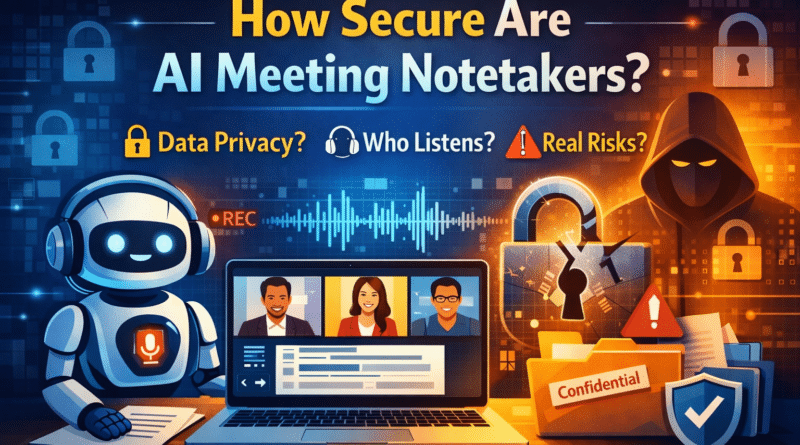
AI-powered meeting notetakers have quietly become part of our daily work lives. Tools like Read.ai, Fireflies.ai, Otter.ai, and similar platforms now join our Zoom, Google Meet, and Microsoft Teams calls, listen to conversations, record audio, transcribe discussions, and generate neat summaries with action items.
They are incredibly convenient — but also deeply sensitive.
A natural question many users, enterprises, and CISOs are now asking is:
How secure are these AI meeting notetakers, really?
This article explains the topic in a clear, human, and practical way, covering:
- What AI meeting assistants actually record
- Where your meeting data goes
- Whether humans or AI models can “read” your meetings
- Real-world security and privacy incidents
- And how this space is likely to evolve in the future
What AI Meeting Notetakers Actually Do (Behind the Scenes)
When you invite an AI notetaker to a meeting, it doesn’t just “take notes” like a silent intern.
Most tools:
- Join the meeting as a bot participant
- Record audio (and sometimes video or shared screens)
- Convert speech to text transcripts
- Analyze conversations using large language models (LLMs)
- Generate summaries, highlights, decisions, and tasks
- Store all of this data in their cloud infrastructure
From a security perspective, that means:
Your confidential business conversations are leaving the meeting platform and living on someone else’s servers.
How These Companies Claim to Secure Your Meeting Data
Most popular AI notetakers publicly state that they follow standard enterprise security practices, such as:
1. Encryption
- Data is encrypted in transit (while being uploaded)
- Data is encrypted at rest (while stored in the cloud)
This protects against basic interception, but does not prevent internal access.
2. Compliance & Certifications
Many vendors advertise:
- SOC 2 Type II compliance
- GDPR alignment (EU privacy law)
- HIPAA support for healthcare customers (usually paid plans only)
These certifications indicate process maturity, not immunity from misuse or misconfiguration.
3. Access Controls
Enterprise versions usually support:
- SSO (Google, Microsoft, Okta, etc.)
- Role-based access
- Admin dashboards
- Audit logs
Free or individual plans often have far fewer controls.
The Biggest Question:
Are Humans or AI Models Reading Your Meetings?
This is where things get uncomfortable — and where fine print matters.
AI Access
- Transcripts and audio are processed by AI models to generate summaries
- Some vendors claim they do not train models on customer data by default
- Others reserve the right to use de-identified or aggregated data to “improve services”
Unless your contract explicitly forbids training, assume it may happen.
Human Access
In many privacy policies, you’ll find language like:
“Authorized personnel may review recordings for quality, support, or research purposes.”
That means:
- Humans can access meetings
- Often triggered during support tickets or QA reviews
- Sometimes outsourced to third-party contractors
This is one of the largest insider-risk areas.
Real Incidents: Has Anything Actually Gone Wrong?
Yes — and not always due to hacking.
1. Accidental Meeting Joins
There have been real cases where AI notetakers:
- Automatically joined meetings via calendar integrations
- Appeared in sensitive calls they were never intended for
- Recorded conversations containing medical or confidential data
In at least one reported case, a healthcare organization treated this as a privacy breach.
2. Institutional Bans
Several universities and enterprises have:
- Blocked or restricted AI notetaker bots
- Disabled calendar-based auto-joining
- Required security approval before use
Not because of a single exploit — but due to unacceptable data exposure risk.
3. Legal & Regulatory Pressure
AI transcription companies have faced:
- Lawsuits over consent and recording disclosure
- Complaints about unclear data usage policies
- Increasing scrutiny from privacy regulators
Even without a massive breach, legal risk is growing fast.
The Most Common Security & Privacy Risks (In Plain English)
Here’s where things usually go wrong:
🔴 Automatic Calendar Access
A bot that can join any meeting on your calendar is dangerous.
🔴 Over-Sharing
Public transcript links or team-wide access expose sensitive conversations.
🔴 Model Training Ambiguity
“Improving our AI” often means using customer data unless blocked by contract.
🔴 Human Review Pipelines
Any human-in-the-loop process increases insider and leakage risk.
🔴 Former Employees
If integrations aren’t revoked properly, bots can keep joining meetings.
How to Use AI Meeting Notetakers More Safely
If your organization allows them, do at least this:
✔ Disable Auto-Join
Require manual approval before a bot joins any meeting.
✔ Restrict Integrations
Only allow approved tools to connect calendars and meeting platforms.
✔ Use Enterprise Plans
Free plans rarely offer strong contractual or security guarantees.
✔ Lock Down Sharing
Disable public links and limit transcript visibility.
✔ Define Retention Rules
Automatically delete recordings after a defined period.
✔ Announce the Bot
Always tell participants that a notetaker is present.
When You Should NOT Use AI Notetakers
Avoid them entirely for:
- Legal strategy meetings
- Healthcare or patient discussions
- M&A and financial negotiations
- Security incident response calls
- Government or regulated communications
In such cases, human note-taking or on-device tools are safer.
The Future of AI Meeting Privacy
This space is changing rapidly. Expect to see:
- Stricter enterprise contracts with “no training” guarantees
- Regional data residency controls
- More regulation around voice data & consent
- On-device or private-cloud meeting AI
- Transparent audit logs showing who accessed what, and when
Convenience is no longer enough — trust and proof will matter.
Final Verdict: Are AI Meeting Notetakers Safe?
AI meeting notetakers are not inherently unsafe, but they are high-impact tools.
Think of them like:
Giving a third-party vendor a recording of your internal meetings — every time.
Used casually, they can expose sensitive data.
Used carefully, with contracts, controls, and awareness, they can be valuable.
The responsibility doesn’t sit only with the AI vendor — it sits with the user and the organization enabling them.