Why Employees Should NOT Use Corporate Email IDs on Third-Party Apps (Social Media & eCommerce)
In today’s digital-first workplaces, a corporate email ID is more than just a communication tool—it is a key to an organization’s internal systems, data, and identity. Yet many employees unknowingly use their official company email addresses to sign up on third-party platforms such as social media, shopping apps, entertainment sites, and online services.
This practice may look harmless, but it creates serious cybersecurity, compliance, and business risks.
In this article, we’ll explain why employees should avoid using corporate email IDs on third-party apps, how data breaches occur, and how one leaked email can impact the entire organization.
What Is a Corporate Email ID?
A corporate email ID (for example: [email protected]) is an official digital identity issued by an organization. It is usually linked with:
- Internal tools (CRM, ERP, HRMS)
- Cloud platforms
- VPN access
- Admin panels
- Client and vendor communications
Because of this, attackers treat corporate emails as high-value targets.
Why Employees Use Corporate Emails on Third-Party Apps
Employees often use work email IDs on:
- Social media platforms (for convenience)
- eCommerce websites (quick checkout)
- Job portals and forums
- SaaS tools and free trials
- Entertainment and subscription services
Common reasons:
- “It’s easy to remember”
- “I check my office email more often”
- “It looks more professional”
Unfortunately, convenience comes at a high security cost.
Major Risks of Using Corporate Email on Third-Party Apps
1. Increased Risk of Phishing Attacks
When your corporate email is exposed on multiple platforms, attackers can:
- Identify you as an employee of a specific company
- Send targeted phishing emails pretending to be HR, IT, or management
- Launch spear-phishing or CEO fraud attacks
These attacks are far more dangerous than random spam.
2. Data Breach at Third-Party Platforms
Even large and popular platforms are not immune to breaches.
Examples of commonly targeted platforms:
- Social media apps
- Online shopping websites
- Gaming and entertainment services
- Free SaaS tools
If a third-party platform is breached, attackers may gain access to:
- Email IDs
- Password hashes
- Phone numbers
- Login behavior and metadata
If the same email/password combination is reused elsewhere, attackers can attempt credential stuffing on corporate systems.
3. Credential Reuse Can Lead to Company-Wide Breach
Many users reuse passwords across services.
If an employee:
- Registers on a third-party app using corporate email
- Uses a similar or same password
- And that app gets breached
Attackers may try logging into:
- Company email
- VPN
- Internal dashboards
- Cloud services
One compromised employee account can become an entry point into the entire organization.
4. Brand Reputation & Trust Damage
When a corporate email is leaked:
- Attackers know exactly which company is affected
- Fake emails can be sent pretending to represent the organization
- Customers and partners may receive fraudulent messages
This can result in:
- Loss of client trust
- Legal consequences
- Brand reputation damage
5. Compliance & Regulatory Risks
Many organizations must comply with standards such as:
- ISO 27001
- SOC 2
- GDPR
- Industry-specific data protection laws
Using corporate emails on unapproved platforms may violate:
- Internal IT policies
- Data protection rules
- Vendor risk management guidelines
This can lead to audit failures and penalties.
How Data Breaches of Third-Party Apps Happen
Understanding breach scenarios helps explain the risk.
Common breach causes:
- Weak password storage
- Misconfigured cloud databases
- Exploited vulnerabilities
- Insider threats
- Malware or ransomware attacks
Once breached, leaked databases are often:
- Sold on the dark web
- Shared in hacking forums
- Used in automated cyberattacks
Corporate email IDs in such dumps are especially valuable.
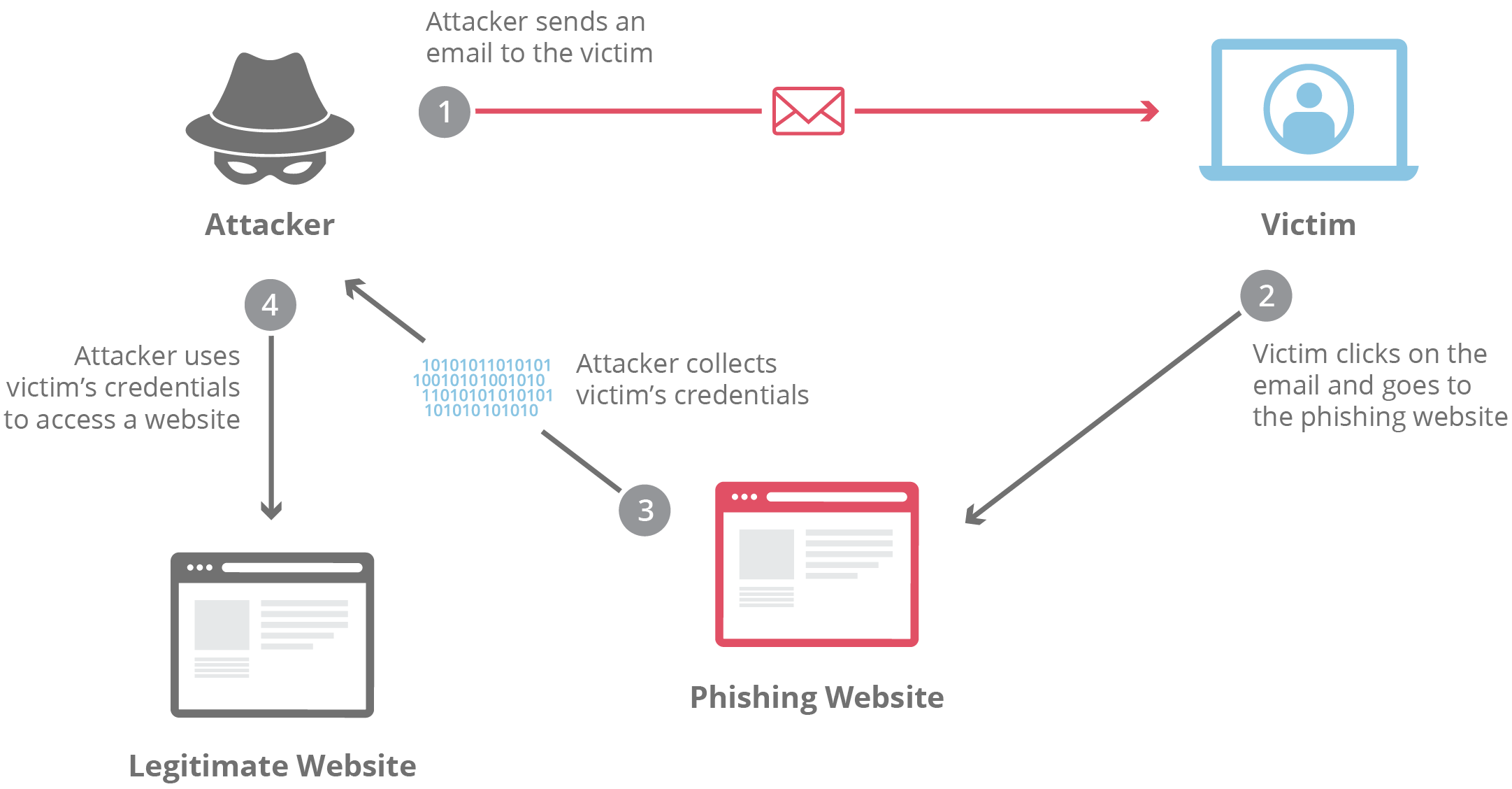
How a Third-Party Breach Impacts Your Organization
A single breach can trigger:
- Account takeovers
- Internal data leaks
- Financial fraud
- Malware infections
- Business email compromise (BEC)
In severe cases:
- Entire networks can be locked via ransomware
- Sensitive client data can be exposed
- Operations can be disrupted for days or weeks
Best Practices for Employees
✔ Use Personal Email IDs for External Apps
Always register on:
- Social media
- eCommerce
- Entertainment
- Non-work tools
using a personal email address.
✔ Never Reuse Corporate Passwords
Corporate credentials should be:
- Unique
- Strong
- Used only for official systems
✔ Enable Multi-Factor Authentication (MFA)
MFA adds an extra security layer even if credentials are compromised.
✔ Follow Company IT & Security Policies
If unsure, employees should:
- Check with IT/security teams
- Use approved tools only
Best Practices for Organizations
Companies should:
- Clearly define email usage policies
- Block corporate emails from registering on risky platforms
- Conduct cybersecurity awareness training
- Monitor leaked credentials via threat intelligence tools
- Enforce MFA and zero-trust access models
To mitigate these risks, organizations must enforce strict technical controls and policies. Learn more in our detailed guide on how IT teams can restrict the use of corporate email IDs on third-party applications.
Final Thoughts
Using a corporate email ID on third-party apps may look harmless, but it opens doors to cyberattacks, data breaches, compliance issues, and reputational damage.
One employee’s convenience can become an organization’s biggest security weakness.
Encouraging safe email practices is not just an IT responsibility—it’s a shared responsibility across the organization.