Apple Creator Studio Explained: Features, Apps, Pricing & How to Use
Apple Creator Studio is a new Apple subscription that bundles Apple’s pro creative apps — Final Cut Pro, Logic Pro, Pixelmator Pro (and others) — together with premium features for Pages/Keynote/Numbers and AI-powered workflow boosts. It’s available as a monthly or annual subscription with student discounts and a free trial, and runs across Mac and iPad where supported.
What is Apple Creator Studio?
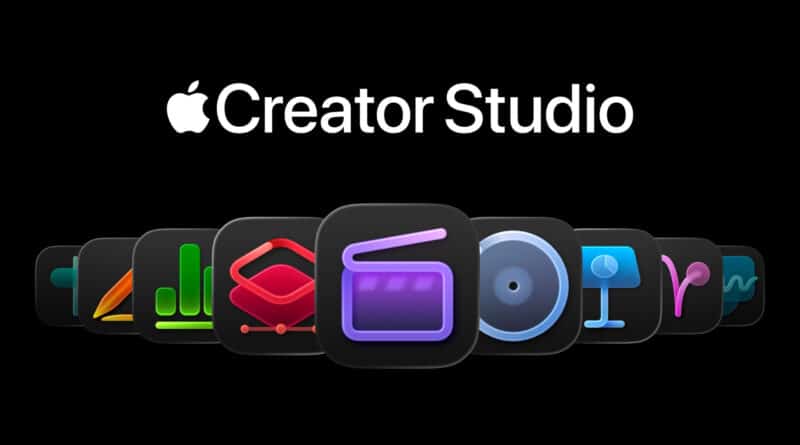
Apple Creator Studio is a single subscription that gives creators access to a suite of studio-grade creative apps and premium content. Apple positions it as an “inspiring collection” for video editing, music production, image creation, and visual productivity — combining its own pro apps with newly integrated features and Pixelmator Pro (now part of the bundle). The goal: make powerful creative workflows more accessible under one affordable plan.
Why this matters for creators
- Simplifies licensing: one subscription instead of buying multiple apps.
- Cross-device workflows: many apps work on Mac and iPad to move projects between devices.
- Smarter tools: new AI and intelligent features to speed up editing, music production, and image work.
Which apps & services are included?
Apple’s launch materials list the core apps bundled in Creator Studio and the premium content/features that become available:
Main apps included
- Final Cut Pro — professional video editing (Mac & iPad features).
- Logic Pro — music production, new intelligent features like Synth Player and Chord ID.
- Pixelmator Pro — photo & imaging app (now coming to iPad with Apple-optimised touch + Pencil experience).
- Motion — motion graphics and visual effects for Final Cut workflows.
- Compressor — export and encoding tools.
- MainStage — live performance tool for musicians.
Plus premium templates/content and intelligent features for Keynote, Pages, Numbers, with Freeform planned to join.
Notable new additions
- Pixelmator Pro on iPad (first-time iPad release).
- AI-powered tools added to Final Cut Pro and Logic Pro to accelerate complex tasks.
Where can you use Apple Creator Studio? (devices & platform)
- Mac: All included apps have robust Mac versions — Final Cut Pro, Logic Pro, Motion, Compressor, MainStage, Pixelmator Pro (Mac-native).
- iPad: Several apps are available on iPad, including Final Cut Pro (iPad features), Logic Pro (iPad version), and the new Pixelmator Pro iPad build — enabling on-the-go editing with Apple Pencil.
- iPhone: Some productivity features (Keynote/Pages/Numbers premium content) and companion experiences integrate across iPhone, but the core pro apps are primarily Mac/iPad-first.
To subscribe and manage the plan you can sign up inside an app or via the App Store subscription flow (open a Creator Studio app → follow prompts).
Pricing — monthly, yearly & student plans (global / India examples)
Apple announced straightforward subscription pricing with a free trial for new subscribers:
- United States: $12.99 / month or $129 / year. Students & educators get a heavily discounted rate (example: $2.99 / month or $29.99 / year).
- India (local price example): ₹399 / month or ₹3,999 / year; students/educators discounted (e.g., ₹199 / month or ₹1,999 / year) — availability rolling out regionally from the announced launch date.
Promotions & trials
- New subscribers typically get a one-month free trial. Apple sometimes offers extended trials or bundled months with eligible Mac/iPad purchases (check local Apple store offers).
Still want a one-time purchase?
Apple will continue to offer certain apps as one-time purchases on the Mac App Store for users who prefer to buy an app outright instead of subscribing.
How to subscribe & get started (step-by-step)
- Open any Apple Creator Studio app (Final Cut Pro, Logic Pro, Pixelmator Pro, Pages/Keynote when interacting with premium content).
- When prompted, tap “Continue” to start the one-month free trial (new subscribers).
- Choose monthly or annual billing and confirm via your Apple ID / App Store purchases.
- Download any other included apps on your Mac or iPad from the App Store — they’ll be unlocked while your subscription is active.
- If you’re a student or educator, verify eligibility to apply the discounted rate.
Who should consider Creator Studio?
- Independent creators & freelancers who need both pro video and audio tools but want a single bill.
- Small studios & educators looking for lower-cost access to professional apps.
- Students — substantial discounts make professional tools affordable while learning.
- Users who use Mac + iPad workflows (Apple’s cross-device features are a strong fit).
Pros & cons (quick take)
Pros
- Excellent value if you need two or more apps (Final Cut + Logic + Pixelmator etc.).
- Cross-device workflow between Mac and iPad.
- New AI features to speed workflows.
Cons
- Adobe still dominant for some workflows (Photoshop/Illustrator/After Effects) — Creator Studio doesn’t include those.
- Professionals tied to Adobe-dependent pipelines may need both subscriptions.
- Some advanced features may remain Mac-only.
FAQ
-
When does Apple Creator Studio launch?
Apple announced the suite in January 2026 with availability starting around January 28, 2026 (region-dependent).
-
Is Creator Studio available on iPad?
Yes — several apps including Final Cut Pro features, Logic Pro, and Pixelmator Pro (new iPad version) support iPad; check the App Store listing for each app to confirm exact device compatibility.
-
Can I cancel anytime?
Yes — like other App Store subscriptions you can cancel via your Apple ID / Subscriptions settings; subscription access continues until the current billing period ends.
Closing & call to action
Apple Creator Studio is Apple’s bold move to simplify access to professional creative tools and make them more affordable — especially for creators who use both video and audio workflows. If you’re a creator who uses Final Cut, Logic, or image editing tools and you work across Mac and iPad, it’s worth testing the one-month trial to see if the bundle saves you money and time.