Planning to Install CCTV Cameras at Your Home or Business: A Complete Guide
Installing CCTV cameras is one of the most effective ways to improve security for your home, shop, office, or commercial property. However, before buying cameras, it’s important to understand what components are required, what storage options are available, and how much storage is actually enough for your needs.
This detailed guide will help you make the right CCTV decision without overspending or facing technical issues later.
Why Install CCTV Cameras?
CCTV systems help in:
- Preventing theft, burglary, and vandalism
- Monitoring your home or workplace remotely
- Collecting video evidence during incidents
- Improving employee and visitor safety
- Gaining peace of mind, even when you are away
Whether it’s a single home camera or a multi-camera business setup, planning is crucial.
Essential Components Required for CCTV Installation
Before installation, make sure you understand the key components involved in a CCTV system.
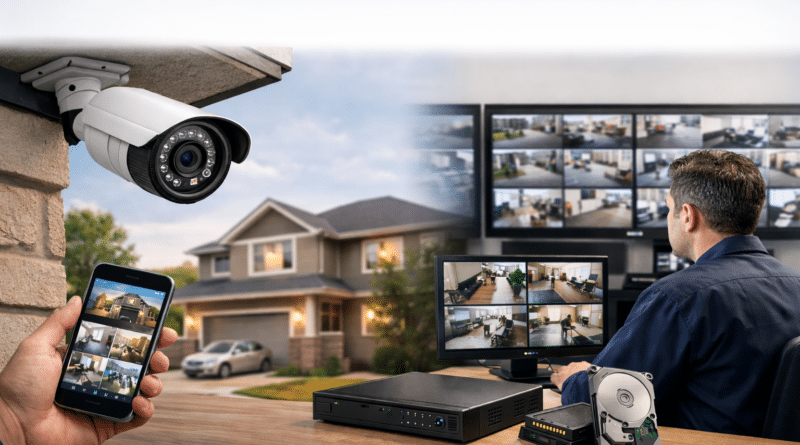
1. CCTV Cameras
Cameras are the most visible part of the system. Common types include:
- Bullet cameras – Ideal for outdoor use and long-distance viewing
- Dome cameras – Suitable for indoor and vandal-prone areas
- PTZ cameras – Allow pan, tilt, and zoom for wide-area monitoring
- Wi-Fi cameras – Easy to install, suitable for homes and small offices
- PoE cameras – Use a single cable for power and data, best for reliability
2. Recorder (NVR or DVR)
- NVR (Network Video Recorder): Used with IP/PoE cameras
- DVR (Digital Video Recorder): Used with analog cameras
The recorder stores footage and allows playback, live view, and remote access.
3. Storage Devices
Storage can be:
- Internal hard drives in NVR/DVR
- microSD cards inside cameras
- Network storage (NAS)
- Cloud-based storage subscriptions
Choosing the right storage is critical and depends on recording quality and retention time.
4. Power and Networking
- Power adapters or PoE switches
- Internet router (for remote access and cloud storage)
- Ethernet cables (Cat5e/Cat6) or strong Wi-Fi coverage
- UPS or power backup for uninterrupted recording
CCTV Storage Options Explained
Option 1: Local Storage (NVR/DVR or SD Card)
Local storage saves recordings on physical devices.
Advantages
- No monthly subscription
- Full control over your data
- Works even if internet is down
Disadvantages
- Limited by hard drive size
- Risk of data loss if recorder is damaged or stolen
This option is popular for businesses and long-term recording needs.
Option 2: Wi-Fi Cameras with Cloud Storage
Cloud cameras store recordings online using a subscription.
Advantages
- Easy installation
- Footage accessible from anywhere
- Safe from physical theft
Disadvantages
- Monthly or yearly cost
- Depends on internet speed and upload bandwidth
This option is best for homes, rented properties, and small setups.
Option 3: Hybrid Storage (Local + Cloud)
Some setups use local recording for continuous footage and cloud backup for important events.
This provides maximum reliability but is slightly more complex.
How Much Storage Is Enough for CCTV?
Storage depends on:
- Number of cameras
- Video resolution (720p, 1080p, 4K)
- Bitrate (data usage per second)
- Recording mode (continuous or motion-based)
- Retention period (7, 15, 30 days, etc.)
Storage Calculation Example
A 1080p camera at 2 Mbps, recording 24/7 for 30 days, requires approximately:
- ~648 GB per camera for 30 days
So:
- 2 cameras → ~1.3 TB
- 4 cameras → ~2.6 TB
- 8 cameras → ~5.2 TB
Using motion detection instead of continuous recording can reduce storage usage by 60–80%.
Quick Storage Reference Table (Per Camera)
| Video Quality | 7 Days | 30 Days |
|---|---|---|
| 1 Mbps | ~76 GB | ~324 GB |
| 2 Mbps (1080p) | ~151 GB | ~648 GB |
| 4 Mbps | ~302 GB | ~1.3 TB |
| 8 Mbps (4K) | ~605 GB | ~2.6 TB |
Tips to Reduce Storage Usage
- Enable motion-based recording
- Use H.265 video compression instead of H.264
- Reduce frame rate for less critical cameras
- Lower resolution for indoor or low-risk areas
These settings help save storage without compromising security.
Placement Tips for Better Coverage
- Install cameras at 8–10 feet height
- Cover entry points like doors, gates, and driveways
- Avoid direct sunlight or reflective surfaces
- Ensure overlapping camera views in critical areas
Proper placement improves footage quality and usefulness.
Legal and Privacy Considerations
Before installation:
- Avoid recording neighbors’ private areas
- Inform employees or visitors where required
- Use signage if cameras monitor public-facing areas
- Secure cameras with strong passwords and updates
Always follow local CCTV and privacy regulations.
Final Thoughts
Installing CCTV cameras is not just about buying cameras—it’s about choosing the right system, storage type, and configuration based on your needs.
- For homes: Wi-Fi or hybrid solutions work well
- For businesses: PoE cameras with NVR and large storage are ideal
- Plan storage carefully to avoid future upgrades
A well-planned CCTV setup ensures long-term security, reliability, and peace of mind.