How to Choose the Right Smart TV in 2026: The Ultimate Indian Buying Guide
Last Updated: June 26, 2026
Buying a new TV today is no longer just about choosing a screen size. Between screen panel variations, HDR formatting, refresh rates, complex gaming mechanics, and competing operating systems, finding the right display can feel overwhelming.
This comprehensive, data-backed 2026 TV buying guide cuts through the marketing noise to help you confidently select the perfect display for your living room, viewing habits, and budget.
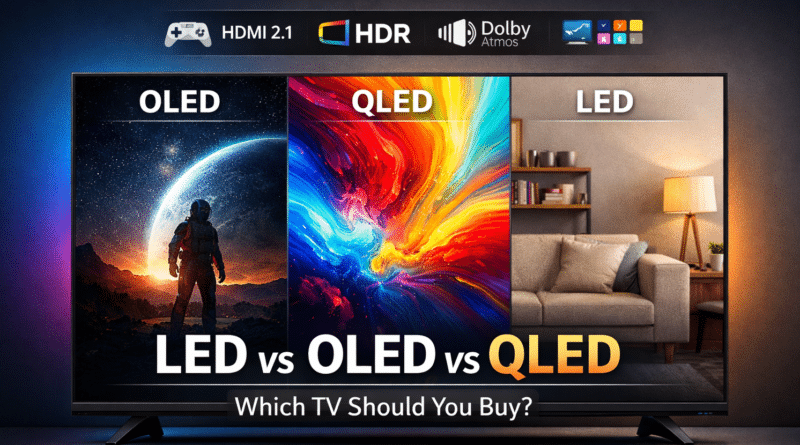
1. OLED vs QLED Which is Better in 2026? Display Tech Explained
Before looking at prices, you must choose the underlying panel technology. The type of display you choose determines the TV’s contrast, color accuracy, and suitability for bright or dark rooms.
LED / LCD (The Budget Baseline)
- How it works: A standard LCD panel illuminated by a constant LED backlight.
- The Reality: It is the default technology for entry-level to mid-range TVs. While modern 4K LED panels offer incredible value, they cannot produce perfect, true blacks because the backlight remains active even during dark scenes.
QLED (Quantum-Dot LED)
- How it works: An LED/LCD display enhanced with a specialized quantum-dot layer that filters light.
- The Reality: QLED screens produce noticeably brighter, more vibrant color variations and possess excellent long-term longevity. They do not suffer from screen burn-in, making them the absolute best choice for bright, sunlit Indian living rooms.
Mini-LED / Neo QLED (The Premium High-Brightness King)
- How it works: A massive evolution of the traditional LED system utilizing thousands of microscopic LEDs coupled with advanced Full-Array Local Dimming (FALD) zones.
- The Reality: Mini-LED offers ultra-high peak brightness and stark contrast control that gets very close to OLED black levels without losing peak brightness. It is the ideal middle-ground if you want dramatic HDR highlights in daylit environments.
OLED / QD-OLED (The Cinematic Masterpiece)
- How it works: Every single pixel is self-lit (Organic LED) and can turn off completely.
- The Reality: Provides true, perfect infinite blacks, striking contrast ratios, and extremely wide viewing angles. It is unmatched for dedicated dark-room home theaters and cinephiles.
- The Caveat: While older models carried burn-in risks, 2026 manufacturing technologies heavily mitigate this. However, premium OLED panels remain the most expensive display tier in the market.
Summary:
- Cinematic performance & dark rooms: Choose OLED or QD-OLED.
- Bright living rooms & heavy daytime use: Choose QLED or Mini-LED.
- Strict budget constraints: Modern 4K LED panels offer the best price-to-performance ratio.
2. Picture Quality & Gaming Requirements: 2026 Standards
To ensure your TV remains future-proof for the next 5 to 7 years, ensure your chosen model hits these baseline technical performance thresholds:
2026 Baseline Minimum Requirements
- True 4K Resolution ($3840 \times 2160$): Avoid 1080p Full HD panels entirely for any screen size $\ge 43$ inches.
- Dynamic HDR Profiling: Look for baseline HDR10 compliance, but prioritize models equipped with Dolby Vision or HDR10+ processing for optimal dynamic range mapping.
- HDMI 2.1 Architecture: Essential if you plan to connect a PlayStation 5, Xbox Series X, or a high-performance gaming PC. Ensure the TV includes at least one dedicated HDMI 2.1 port capable of handling 4K at 120Hz, Variable Refresh Rate (VRR), Auto Low Latency Mode (ALLM), and low input lag.
Recommended Premium Additions
- Native 120Hz Refresh Rate: Ensures fluid motion handling across high-speed live sports broadcasts and cinematic action sequences.
- High Peak Brightness: If you routinely watch HDR content in sunlit spaces, look for a certified peak brightness of $\ge 600 \text{ to } 1000 \text{ nits}$.
- Anti-Reflection Filters: Premium panels include specialized polarization coatings to diffuse glare from nearby doors or windows.
3. Which Set Top Box is Best for 4K TV? Soundbar vs. In-Built Audio
As smart TVs become increasingly thin, their internal acoustic chambers shrink. Built-in TV speakers are typically limited in bass response and soundstage scaling.
Minimum Audio Benchmarks
- HDMI eARC (Enhanced Audio Return Channel): A non-negotiable feature if you plan to route high-definition, lossless audio formats like Dolby Atmos or DTS:X out from your TV to an external audio system.
- Power Output: Look for a minimum built-in layout of $20\text{W to } 40\text{W}$ with multi-driver arrays. Anything under $20\text{W}$ will sound thin in a medium-to-large room.
Which Set-Top Box & Audio Integration is Best?
To maximize a premium 4K television in the Indian market, match your visual setup with a capable media feed. The top modern choices include:
- Airtel Xstream Box / JioHomeTV / Tata Play Binge+: These Android-powered hybrid boxes pass native 4K visual feeds directly into your panel while handling Dolby Atmos audio passthrough seamlessly.
- The Soundbar Upgrade Strategy: Even an entry-to-mid-range external soundbar bundled with a wireless subwoofer will vastly outperform built-in TV speaker modules. If you want true cinematic immersion, budget for a dedicated Dolby Atmos-capable soundbar array.
- Premium Exceptions: Select flagship models from brands like Sony and Panasonic include integrated multi-driver acoustic soundstages that vibrate the glass itself to track dialogue across the screen, though they command a high price premium.
4. Smart TV Operating Systems: Google TV vs. Tizen vs. webOS
Your daily interaction with your television relies heavily on its built-in software platform. Here is how the dominant ecosystems compare in 2026:
| Operating System | Best Suited For | Key Strengths | App Ecosystem |
| Google TV (Android Evolution) | Universal / Android Users | Class-leading Google Assistant voice parsing, personalized content curation, built-in Chromecast ecosystem. | Extensive (Play Store access for all Indian OTT apps) |
| Samsung Tizen | Ecosystem Match / Gamers | Lightning-fast interface loading, robust integrated Game Hub panels, smooth control via Samsung smart home arrays. | Top-Tier (All major local & global platforms) |
| LG webOS | Fluid Navigation | Signature “Magic Remote” motion control, clean dashboard layouts, efficient hardware-level optimization. | Top-Tier (Highly stable, responsive app loads) |
| Amazon Fire TV | Prime Members / Alexa Homes | Native Alexa integration, content tracking geared heavily toward Amazon Prime ecosystem members. | Broad App Support |
5. TV Size Guide & Ideal Viewing Distances
For immersive 4K panels, you can comfortably sit closer to a large screen than you could with legacy 1080p displays without noticing pixel degradation.
- The Formula: $\text{Optimal Viewing Distance (Inches)} \approx \text{Screen Size} \times 1.2 \text{ to } 1.6$
| Screen Size | Recommended Viewing Distance Range | Best Placement |
| 43 Inches | 4.3 feet to 5.7 feet ($130 \text{ cm} – 175 \text{ cm}$) | Small bedrooms / Kitchen counters |
| 55 Inches | 5.5 feet to 7.3 feet ($170 \text{ cm} – 220 \text{ cm}$) | Standard apartment living rooms |
| 65 Inches | 6.5 feet to 8.6 feet ($200 \text{ cm} – 260 \text{ cm}$) | Medium-to-large family rooms |
| 75+ Inches | 7.5 feet to 10+ feet ($230 \text{ cm} – 300\text{+ cm}$) | Dedicated home theater spaces |
6. Smart TV Price Guidance & Cost Scaling
Understanding display cost drivers ensures you prioritize features that provide the highest return on investment.
[Basic 4K LED Display]
        │
        ▼ (Adds 20% - 40% Premium)
[QLED / Advanced Local Dimming]
        │
        ▼ (Adds 40% - 100% Premium)
[OLED / Mini-LED Flagship Tiers]
Feature Upgrade Cost Factors
- 60Hz to 120Hz Panel Swap: $+15\% \text{ to } 30\%$ cost increase.
- Full-Array Local Dimming Integration: $+15\% \text{ to } 35\%$ cost increase.
- HDMI 2.1 & Dedicated VRR Gaming Suite: $+10\% \text{ to } 25\%$ cost increase.
7. Real-World Indian Buying Scenarios (Prices as of 2026)
The Value-Focused Buyer
- Usage Profile: Daily news broadcasts, streaming serials, casual streaming apps.
- Ideal Configuration: 4K LED panel paired with Google TV for ease of application access.
- Target Budget: ₹25,000 to ₹40,000 (Plan to add an entry-level soundbar down the line).
The Vibrant Family Living Room
- Usage Profile: High-glare rooms, daytime viewing, active mixed media consumption.
- Ideal Configuration: QLED or Mini-LED display offering high peak nit values to cut through ambient lighting.
- Target Budget: ₹40,000 to ₹80,000 (Pairs best with a midrange 2.1 channel soundbar).
The Cinematic Cinephile
- Usage Profile: Nighttime viewing, 4K Blu-Rays, high-bitrate streaming formats.
- Ideal Configuration: OLED or premium QD-OLED display with Dolby Vision capability and a calibrated color profile.
- Target Budget: From ₹75,000 for entry-level models to ₹2,00,000+ for flagship configurations.
The Next-Gen Console Gamer
- Usage Profile: High-framerate PS5/Xbox gaming, PC gaming connection.
- Ideal Configuration: Any display tier with guaranteed native 120Hz panels, variable refresh rate options, and low input lag metrics.
- Target Budget: ₹50,000 and upward depending on screen size selections.
8. Ultimate Pre-Checkout Checklist
Before entering your payment credentials online or at an electronics storefront, verify these points:
- Is the resolution natively 4K with Dolby Vision or HDR10+ compliance?
- Does the input selection panel include an HDMI eARC terminal for your soundbar?
- Is the internal smart operating system responsive and compatible with your smart ecosystem?
- Have you validated real-world peak brightness and dimming zone measurements from third-party hardware reviewers instead of relying on box marketing?
- What is the brand’s exact local warranty policy regarding display panel replacement?
9. Frequently Asked Questions (FAQ)
-
What is the best TV brand in India right now?
The Indian market is divided into distinct tiers. For ultra-premium processing, picture accuracy, and panel engineering, Sony, LG, and Samsung remain the undisputed industry leaders. For value-driven buyers looking for high feature-counts at aggressive pricing, brands like TCL, Hisense, and Xiaomi offer exceptional alternative choices in the QLED and Mini-LED spaces.
-
Is an OLED TV worth it if my living room has multiple windows?
If your room receives direct daylight, a high-end Mini-LED or bright QLED TV may be a better choice because they can achieve double the peak brightness of standard OLED screens, cutting through ambient room glare more efficiently. OLED excels best when you can control your room lighting.
-
Do I actually need HDMI 2.1 to watch 4K content?
No. Standard HDMI 2.0 connection interfaces handle standard 4K streaming feeds at 60Hz perfectly. HDMI 2.1 is explicitly required for fast-paced interactive gaming environments requiring 120Hz refresh rates, low input lag, and variable refresh adjustments.
Join the Discussion: Got a specific model in mind or hunting for active deals? Drop your thoughts or read alternative suggestions over on our community forum: Which is the Best Smart TV Available in the Market Right Now? Need Suggestions Across Budget Ranges